Archive for category Linux
Remove DOS carriage return
After writing a shell script on Windows and trying to execute it on Linux, I got the following error message:
/bin/sh^M: bad interpreter: No such file or directory
The problem is obviously because the return line character on Windows and Linux are different. But how to fix it in order to execute it on Linux?
I firstly tried to open it, copy the content of the file and paste it in a new file using only Linux command line, but it didn’t work. 🙁
However, I found the following thread which fixed the problem:
http://www.reachdba.com/showthread.php?335-bin-sh-M-bad-interpreter-No-such-file-or-directory-apps11i-Instalation
Here is what you need to do:
- Open your file using vi
- Write the command
:set fileformat=unix - Save the file using
:wq
The file should now run on Linux. 🙂
CP2102 on DNS-323
In one of my personal projects, I needed to connect and use a USB to RS232 (Serial) converter on my D-Link DNS-323. Weird requirements, I know. Anyway… 😐
Plenty of these converters exist out there, but I choose to go for a CP2102:
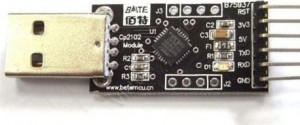
Innocently, I first tried to compile the code source of this module which can be found on the following page:
http://www.silabs.com/products/mcu/Pages/USBtoUARTBridgeVCPDrivers.aspx
After a few painful and unsuccessful tries, I decided to look around for the already-compiled module. 😉
While wondering why I didn’t think of that before, I used the instructions below to install the required modules on my NAS:
cd /mnt/HD_a2/ffp/lib/
mkdir modules
mkdir modules/2.6.12.6-arm1
cd modules/2.6.12.6-arm1
wget http://dev.skcserver.de/dns323/modules_v1.03/kernel/drivers/usb/serial/usbserial.ko
wget http://dev.skcserver.de/dns323/modules_v1.03/kernel/drivers/usb/serial/cp2101.ko
chmod 755 usbserial.ko
chmod 755 cp2101.ko
Once the modules are installed, the next step is to initialize them.
I wrote the following script for this purpose so you can execute it anytime you need it:
#!/bin/sh

insmod /ffp/lib/modules/2.6.12.6-arm1/usbserial.ko
insmod /ffp/lib/modules/2.6.12.6-arm1/cp2101.ko
mknod /dev/ttyUSB0 c 188 0
chmod 0666 /dev/ttyUSB0
At this point in time, you should have your module initialized on your D-Link DNS-323.
You can check the kernel ring buffer using the dmesg command to verify it loaded properly.
This is a snapshot of what I have in my kernel ring buffer after I ran the script above:
usbcore: registered new driver usbserial
drivers/usb/serial/usb-serial.c: USB Serial support registered for Generic
usbcore: registered new driver usbserial_generic
drivers/usb/serial/usb-serial.c: USB Serial Driver core v2.0
drivers/usb/serial/usb-serial.c: USB Serial support registered for CP2101
CP2101 1-1:1.0: CP2101 converter detected
usb 1-1: reset full speed USB device using ehci_platform and address 5
usb 1-1: CP2101 converter now attached to ttyUSB0
usbcore: registered new driver CP2101
drivers/usb/serial/cp2101.c: Silicon Labs CP2101/CP2102 RS232 serial adaptor driver v0.04
Finally, you can test the communication with your USB to RS232 converter by connecting a LED between the RXD and 3V outputs and running the following script:
#!/bin/sh

while [ true ]
do
echo "hello world!!!" > /dev/ttyUSB0
echo "sent"
sleep 1
done
If you see the LED blinking, it means you succeed! 😀
Ubuntu on Mac Mini PowerPC
The other day, I got an old Mac Mini PowerPC from 2005. And I decided to install Linux on it instead of using an old version of Mac OSX. Fun, ins’t it?
The first thing I did was to download the ISO image of the last version of Ubuntu and burn it on CD. But unfortunately, I discovered that the CD player wasn’t working anymore. 😐
I then tried to put Ubuntu on a USB key and boot on it. But it didn’t work either… This machine didn’t seem to be able to boot from a USB stick.
So how am I going to install Linux without a CD player and USB?
FireWire? Maybe, but I don’t have anything on FireWire.
The answer is netboot! 😀 Indeed, my last chance was to install it via netboot.
Here are the steps I followed:
- Install tftp on another Linux machine in your local network
- Configure tftp. Please find below the configuration file I used:
# # ftp://ftp.kernel.org/pub/software/network/tftp/ # service tftp { flags = REUSE socket_type = dgram protocol = udp instances = 30 wait = yes user = root server = /opt/sbin/in.tftpd server_args = -s /mnt/tftpboot cps = 100 2 log_on_success = HOST PID log_on_failure = HOST disable = no } - Put the Ubuntu files in the folder
/mnt/tftpboot(in my case). I copied the files of the last version of Ubuntu “Quantal”: http://ports.ubuntu.com/ubuntu-ports/dists/quantal/main/installer-powerpc/current/images/powerpc/netboot/ - Reboot the Mac Mini and enter the Open Firmware by holding “Option”+”Command”+”o”+”f”
- Type the following command to start the install:
boot enet:192.168.2.100,yaboot
With 192.168.2.100 the IP address of the machine where tftp is installed.
- Follow the Ubuntu installation steps and enjoy! 🙂
Redirect traffic to a specific network
This is a little trick which can be useful in some very specific case.
For example, you could have a machine with two network cards. One of the network is behind a proxy and the other one is connected directly to the internet.
You might want to forward all the traffic for google.com to the network which doesn’t have a proxy.
To do this, I am using the command route:
route add <hostname> <target network>
For example:
route add google.com 192.168.101.1
Note that this command is available on both Linux and Mac.
Install a JDBC driver in SpagoBI
For those who don’t know what is SpagoBI, please read the following (copied from Wikipedia):
SpagoBI is the only entirely Open Source Business Intelligence suite, belonging to the free/open source SpagoWorld initiative, founded and supported by Engineering Group.
SpagoBI supports day-to-day and strategic business, both at the decision-making and operational levels. SpagoBI is a BI suite because it covers the whole range of analytical needs, supporting developers, testers and administrators in their daily activities.
SpagoBI is not very difficult to install but it is a bit more complicated to configure.
One of the problem I had was the following one:
GRAVE: Cannot open connection.
org.eclipse.birt.report.data.oda.jdbc.JDBCException:
Cannot load JDBC Driver class: com.microsoft.sqlserver.jdbc.SQLServerDriver
This exception is quite clear, it means that SpagoBI cannot load the JDBC driver for SQL Server. Indeed, I was connecting to a SQL Server database from one of my BIRT report.
What you have to do to fix this problem is:
- Download the driver JAR file from the Microsoft website: http://www.microsoft.com/download/en/details.aspx?id=2505
- Copy the JAR file into the following folder under the SpagoBI installation folder:
webapps/SpagoBIBirtReportEngine/WEB-INF/platform/plugins/org.eclipse.birt.report.data.oda.jdbc_2.6.1.v20100909/drivers
Note that the path might differ a little bit depending on the version of SpagoBI. - Restart SpagoBI
-
You are currently browsing the archives for the Linux category.
WWF – Help us